Etching
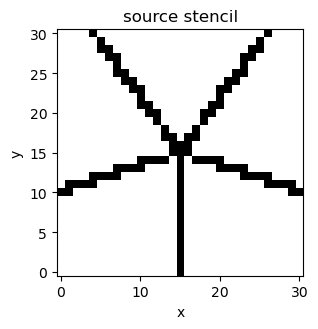
Set inverted=True on a gate when the stencil marks an opening instead of
deposited metal. Tempura inverts that stencil and turns each disconnected
region into its own gate.
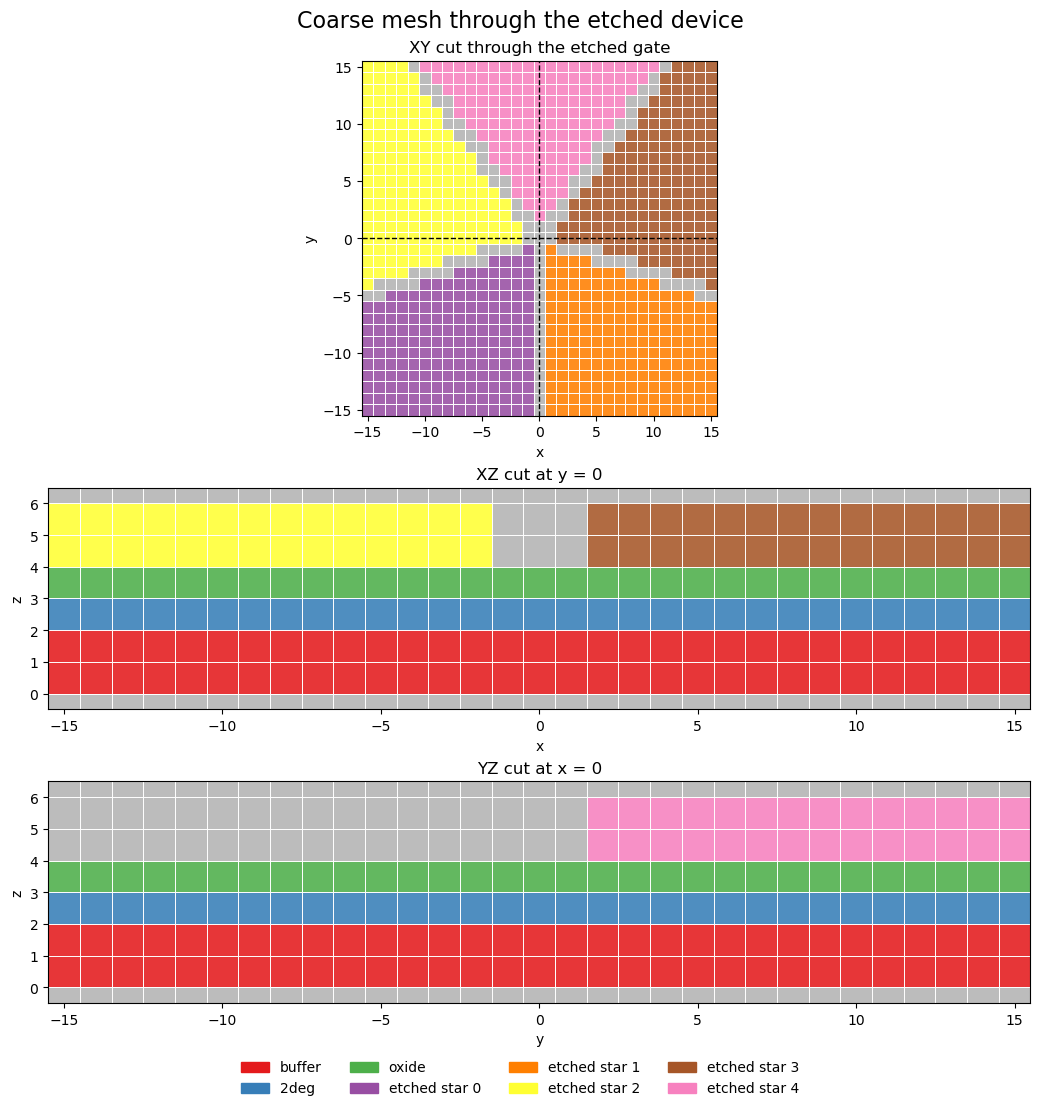
Opening
Here the opening is a simple five-arm star.
import matplotlib.pyplot as plt
import numpy as np

from tempura.electrostatics import build_problem
from tempura.layout.layout_pipeline import build_device
from tempura.plotting import (
    add_plane_cut_guides,
    make_xy_emphasis_axes,
    make_standard_plane_specs,
    nearest_axis_value,
    plot_problem_regions_with_mesh,
)


def ray_mask(
    shape: tuple[int, int],
    angle_deg: float,
    *,
    center: tuple[float, float],
) -> np.ndarray:
    """Draw one thin ray from the center to the edge of the grid."""
    mask = np.zeros(shape, dtype=bool)
    cy, cx = center
    theta = np.deg2rad(angle_deg)
    steps = np.linspace(0.0, max(shape), 6 * max(shape) + 1)
    rows = np.rint(cy - np.sin(theta) * steps).astype(int)
    cols = np.rint(cx + np.cos(theta) * steps).astype(int)
    valid = (rows >= 0) & (rows < shape[0]) & (cols >= 0) & (cols < shape[1])
    mask[rows[valid], cols[valid]] = True
    return mask


shape = (31, 31)
center = ((shape[0] - 1) / 2.0, (shape[1] - 1) / 2.0)
opening = np.zeros(shape, dtype=bool)

for angle in (90, 18, -54, -126, 162):
    opening |= ray_mask(shape, angle, center=center)
fig, ax = plt.subplots(figsize=(3.6, 3.4))
ax.imshow(opening, origin="lower", cmap="Greys", interpolation="nearest")
ax.set_title("source stencil")
ax.set_xlabel("x")
ax.set_ylabel("y")
fig.tight_layout()
Invert it
The stack below has a buffer, a 2DEG, one dielectric, the etched gate, and a
top dielectric.
prepared = {
    "grid_step": 1.0,
    "roi_size": (31.0, 31.0),
    "grid_shape": shape,
    "gate_stencils": {"star": [opening]},
}

stack = [
    {
        "kind": "dielectric",
        "name": "buffer",
        "permittivity": 12.9,
        "thickness": 2.0,
    },
    {
        "kind": "2deg",
        "name": "2deg",
        "permittivity": 12.9,
        "thickness": 1.0,
    },
    {
        "kind": "dielectric",
        "name": "oxide",
        "permittivity": 9.1,
        "thickness": 1.0,
    },
    {
        "kind": "gate",
        "name": "etched_star",
        "source_layer": "star",
        "thickness": 2.0,
        "inverted": True,
    }
]

device = build_device(prepared, stack)
etched_gate_names = [name for name in device.layers if name.startswith("etched_star_")]

print(etched_gate_names)
assert len(etched_gate_names) == 5
['etched_star_0', 'etched_star_1', 'etched_star_2', 'etched_star_3', 'etched_star_4']
component_map = np.zeros(shape, dtype=int)
for index, gate_name in enumerate(etched_gate_names, start=1):
    component_map[device.layers[gate_name].stencil] = index

fig, axes = plt.subplots(ncols=2, figsize=(6.6, 3.0), sharex=True, sharey=True)

axes[0].imshow(opening, origin="lower", cmap="Greys", interpolation="nearest")
axes[0].set_title("opening")
axes[0].set_xlabel("x")
axes[0].set_ylabel("y")

axes[1].imshow(component_map, origin="lower", cmap="tab10", interpolation="nearest")
axes[1].set_title("five etched gates")
axes[1].set_xlabel("x")

plt.tight_layout()
Planes
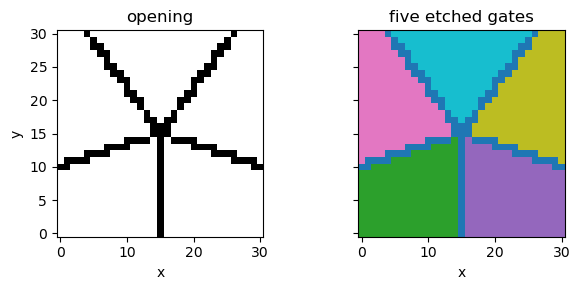
The same device can go through build_problem(...). The mesh here is coarse on
purpose, so the plane plot stays small and easy to read.
problem_builder, region_shapes, gate_names = build_problem(device, vacuum_scale=2.0)
problem = problem_builder.finalized()

assert gate_names == etched_gate_names

coordinates = np.asarray(problem.coordinates, dtype=float)
gate_bbox = np.asarray(device.layers[gate_names[0]].shape.bbox, dtype=float)
gate_mid_z = float(0.5 * (gate_bbox[0, 2] + gate_bbox[1, 2]))

xy_z = nearest_axis_value(coordinates, 2, gate_mid_z)
x_cut = nearest_axis_value(coordinates, 0, 0.0)
y_cut = nearest_axis_value(coordinates, 1, 0.0)

plane_specs = make_standard_plane_specs(
    device,
    xy_title="XY cut through the etched gate",
    xy_plane_z=xy_z,
    xz_title="XZ cut at y = 0",
    xz_plane_y=y_cut,
    yz_title="YZ cut at x = 0",
    yz_plane_x=x_cut,
)

fig, axes = make_xy_emphasis_axes(
    figsize=(10.4, 11.0),
    layout="stack",
    height_ratios=(1.6, 1.0, 1.0),
)

fig, axes = plot_problem_regions_with_mesh(
    problem,
    region_shapes,
    [plane_specs["XY"], plane_specs["XZ"], plane_specs["YZ"]],
    axes=axes,
    suptitle="Coarse mesh through the etched device",
    show_volume_edges=True,
    show_mesh_points=False,
    coordinate_scale=1.0,
)

add_plane_cut_guides(axes[0], x=x_cut, y=y_cut, coordinate_scale=1.0)